
How to Apply for a UK Spouse Visa from Pakistan
Ready to build your life together in the UK?



Home / News and Articles / How UKVI works
UKVI inside series · Part 1Most applicants picture a caseworker opening a folder with their name on it. That is not what happens. Since the Home Office moved from its old CID database to a system called Atlas, every UK visa decision starts from a single record that already knows your past applications, your fingerprints, your travel and, in some cases, decisions made about you by other countries. This guide explains what Atlas is, what it holds, and what that means before you press submit.
For about 25 years, UK visa and status decisions were recorded on the Case Information Database, known inside the Home Office as CID. It was first implemented in 2000. CID was built around cases: each application was a file, and officers often had to retype the same details into other systems. By 2019 the Public Accounts Committee was warning that the Home Office was making decisions about people’s rights using data from systems that were “not fit for purpose”.
The replacement programme took about eight years. The Home Office’s own account describes “a complex 8 year journey” interrupted by Brexit, Covid, the Afghan resettlement schemes and the Ukraine schemes. Delivery dates slipped at least seven times. Contracts signed from 2020 for the new system were reported at around GBP 79.7 million, with Accenture, Mastek and PA Consulting among the suppliers.
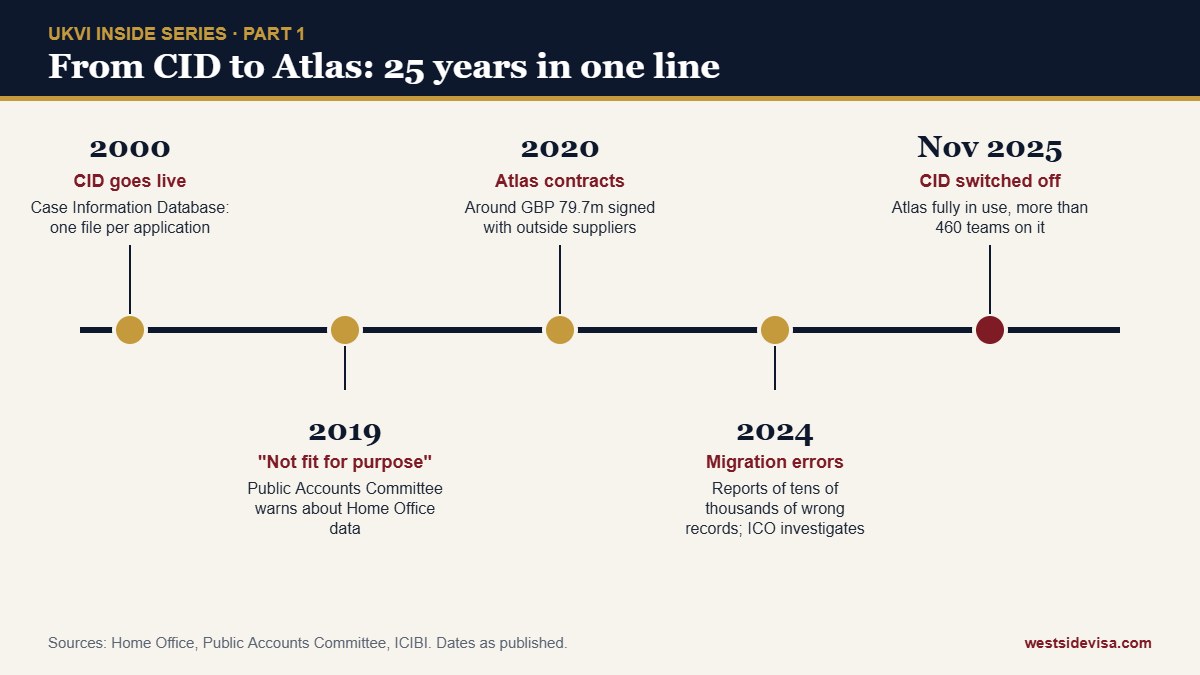
Atlas is the Home Office’s caseworking system for visas, status and asylum work. The Home Office says it is built and owned in house by its Migration and Borders Technology Portfolio, and that by November 2025 more than 460 teams were working on it and CID had been “successfully decommissioned”.
In practical terms, Atlas does five things that affect you:
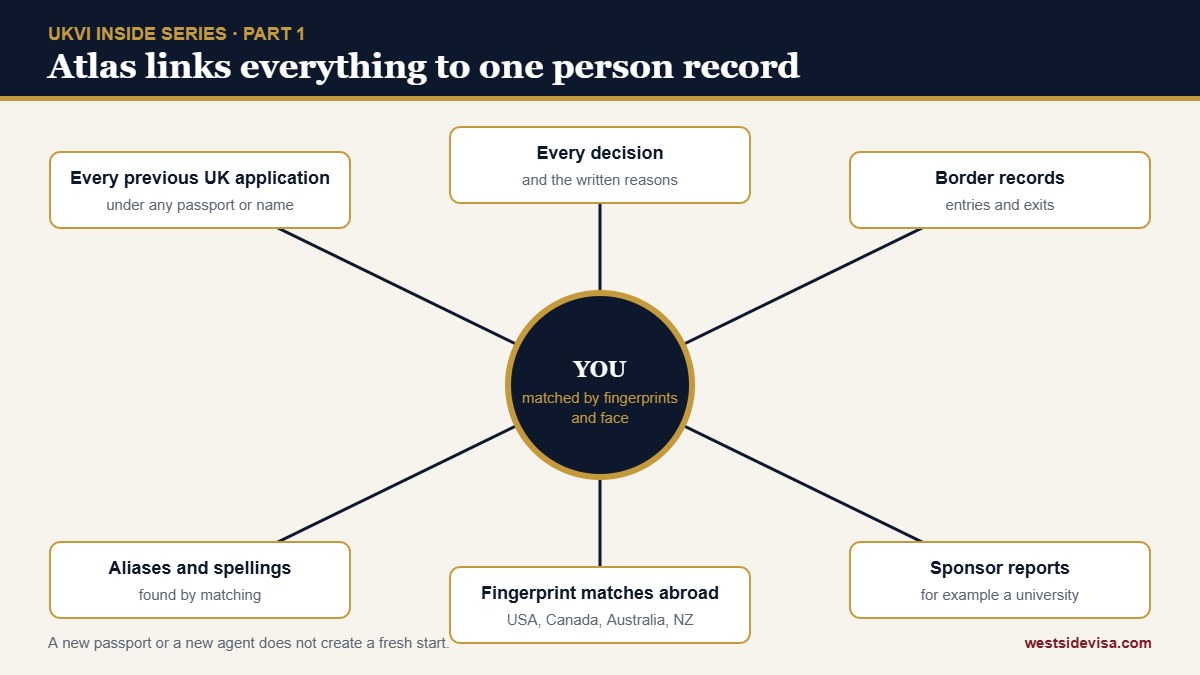
The most important change for an applicant is the shift from a case file to a person record. In CID, a 2014 visit application and a 2026 student application could sit as two separate files. In Atlas, both hang off one identity: you.
That record is tied to your biometrics. Fingerprints and facial images are stored on a separate biometrics system and matched every time you enrol again. The Home Office’s biometrics guidance says fingerprints taken from July 2021 are generally kept for up to 15 years, and reusing them on a new application can restart that period. Fingerprints are also used to check “applications against existing records” and to confirm identity when documents alone cannot.
The consequence is simple. A new passport, a changed spelling of your name, or a different agent does not create a fresh start. Your fingerprints connect the new application to everything before it.
From the published guidance and data protection assessments, an Atlas person record can bring together:
What this means in practice: an undeclared negative decision from the United States or Canada can surface through a fingerprint match, even if you never mention it. Declaring it honestly is always safer than hoping it stays hidden.
Moving millions of records from CID to Atlas was not clean, and this matters because errors in your record can shape a decision.
For an applicant from Pakistan, the practical risk is a duplicated or merged record: two person records for the same applicant that later get joined, or a sibling’s details attached to yours because of a shared address and surname. If a decision letter mentions something you never submitted, a record error is one possible explanation and you can ask to see the record.
Your eVisa is not stored in Atlas. The Home Office’s data protection assessment for the “view and prove” service explains that status data is pulled from a Person Centric Data Platform, which aggregates data from CID, Atlas, the biometrics system and several other caseworking systems. Your face image comes from the biometrics store. Each time you sign in, the service fetches that data fresh.
So when an eVisa shows the wrong name, dates or conditions, the fix has to happen in the caseworking system first. The assessment says rights requests are “actioned on core systems first, then reflected in View and Prove when status is next requested”. That is why eVisa corrections can take weeks, and why you should check your eVisa as soon as a visa is granted, not the night before you fly.
Share codes generated from your eVisa are valid for 90 days. Employers, landlords and several government bodies (DVLA, DWP, HMRC, the NHS and the Student Loans Company among them) can check your status through linked services.
Not sure how this applies to your case?
Send us your question on WhatsApp. A Westside adviser in DHA Lahore will reply, Monday to Saturday, 10:00 to 18:00.
Ask on WhatsApp| Number | Where you see it | What it is for |
|---|---|---|
| GWF number | Your online application confirmation | Identifies the application in the online form system; the one VFS uses |
| Unique Application Number (UAN) | Decision letters and UKVI emails | Identifies the application inside the Home Office |
| IHS reference | Health surcharge payment receipt | Links your surcharge payment to the application |
| Home Office reference | Older letters, appeals, subject access responses | Identifies you as a person across applications |
| UKVI account | eVisa sign in | Links your identity document to your status record |
When you chase an application, quote the GWF number to VFS and the UAN to UKVI. Quoting the wrong one is a common reason enquiries go nowhere.
You have a legal right to a copy of the personal data the Home Office holds about you. This is called a subject access request. It is free, made online, and the Home Office normally has one month to respond, which can be extended for complex requests.
What you get back is usually a printout of your person record and case notes. Older cases show “GCID” notes from the CID era; newer ones show Atlas case notes. Some lines will be blanked out where an exemption applies. Reading these notes is the single best way to understand why a past application was not granted and what the next officer will see.
Be careful: a subject access request is not a way to influence a pending application and it does not speed anything up. Use it between applications, not during one.
This is Part 1 of our series on how UKVI handles an application from the inside. Part 2 covers the first 48 hours after you submit and Part 3 covers the checks that run before a human reads your file.
Yes. Records were migrated into Atlas, and your person record links past applications to you through biometrics and biographical data. Subject access responses for older cases still show CID era notes.
Yes. Fingerprint matching links the new application to your existing person record regardless of the passport used.
Your eVisa pulls data from a central platform fed by Atlas and other systems. If the underlying record is wrong, the eVisa is wrong. Report the error through the GOV.UK eVisa error form; the correction is made in the caseworking system first.
Make a subject access request on GOV.UK. It is free and the Home Office normally responds within one month. You will receive your person record and case notes, with some lines withheld under exemptions.
Under the five country arrangement, fingerprints can be checked against records held by the United States, Canada, Australia and New Zealand. A match can return identity details, past decisions and travel document information.
They can. Inspectors found duplicated and missing records and discrepancies between systems after the move. If a decision letter refers to something you never submitted, ask to see your record.
Checked on 27 October 2026. Where the Home Office has not published how Atlas works internally, this guide says so and relies on inspection reports and official data protection documents. General information, not legal advice.

Mujtaba is the CEO of Westside Visa Consultants. He began his career in 2001 as Executive Secretary to the Consul General of the Republic of Korea in Karachi, co founded Westside in London in 2003, and has since guided more than 1,000 students and families through UK, European, North American and Australian visa decisions from the firm’s offices in DHA Lahore and the UK. He holds postgraduate degrees from the University of Karachi, the University of Padua, Loughborough University and the University of West London, and writes this series from more than twenty years of reading decision letters.
Connect with Mujtaba on LinkedIn · About Westside · WhatsApp the office
Confirmed visa changes for Pakistani students, visitors and families, checked against official sources.
Westside Visa Consultants prepares UK visit, study and family applications with your full record in mind. Fees quoted in writing, honest advice first.
First Floor, 22 A, Sector A, Phase 5, DHA, Lahore · Monday to Saturday, 10:00 to 18:00
This guide is general information, not legal or migration advice. Westside Visa Consultants is an independent private advisory, not affiliated with any government, embassy or visa centre. Always check the official sources before you apply.

A curated list of the most popular travel packages based on different destinations.
Ready to build your life together in the UK?
Dreaming of studying at a world class UK university?
Planning to send your child to the UK for a holiday, to visit family, or for a short course?
A UK PhD gives you a world class research degree, generous funding options, and, importantly, a post study advantage that survives the 2027 migration changes: doctoral graduates keep the full three year Graduate Route.
Submitted your UK visa application? Here is what UKVI does in the first 48 hours: validity checks, biometrics, the 240 day rule, allocation to a decision centre and why the clock starts later than you think.
Not every UK visa applicant is interviewed. Here is how UKVI selects who is, how student credibility and visit interviews are run, what is asked, and why the transcript matters more than the conversation.
Apply on or before 31 December 2026 and you get 2 years. Apply on or after 1 January 2027 and you get 18 months. The date that matters is the date you submit the application, not the date your course ends.
Choosing where to do your PhD is one of the biggest decisions of your academic life, and the four leading English speaking destinations each offer something different.